Updated: November 5, 2026 · By the HomeHDR Team.
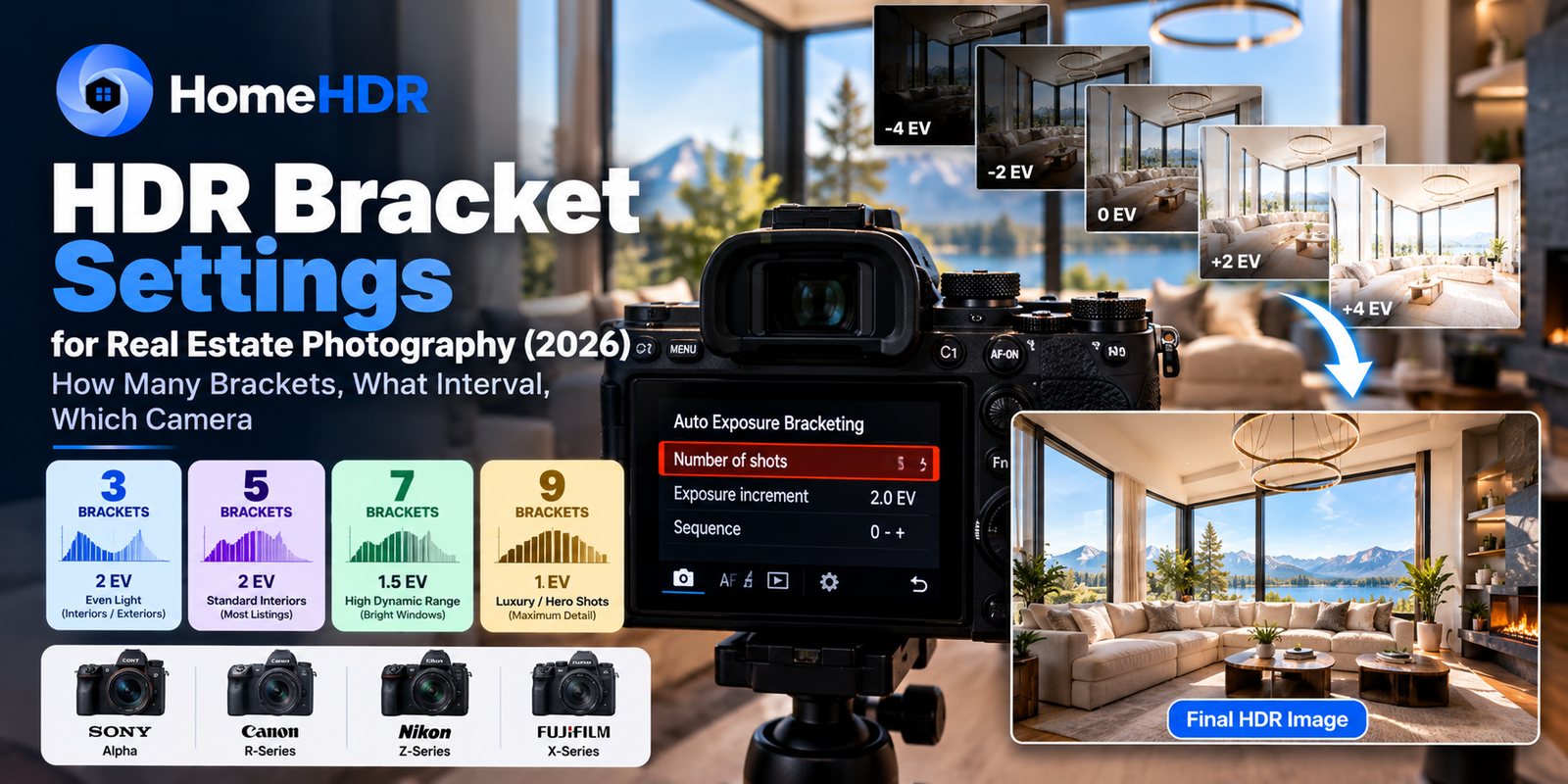
Quick answer: For most real estate interiors, start with 5 brackets at 2 EV. That covers 8 stops, from -4 to +4. Step up to 7 brackets at about 1.5 EV for a dark room with bright windows, and drop to 3 brackets at 2 EV in even light. What your camera can do varies by model, so check your manual: some bodies cap the frame count at wider intervals. HomeHDR groups your sets from the image content, merges up to 8 frames into one photo, and charges $0.36–$0.55 per finished photo, not per frame. You can start with 15 free edits, no credit card.
You already know HDR bracketing on paper. The question that eats time is the five-second decision in the kitchen doorway: 5 frames or 7 today, and at what interval? On a four-listing day, every trip into the bracketing menu costs you.
This guide covers what to set, when to change it, how the main camera brands differ, and the mistakes that spoil a merge.
How many brackets do you need for real estate photography?
Direct answer: 5 brackets at 2 EV suits most standard interiors. Go to 7 brackets at about 1.5 EV when the contrast is extreme, and use 3 brackets at 2 EV in even light. The right count depends on the contrast in the scene, not the type of property.
| Scene | Brackets | Interval | Why |
|---|---|---|---|
| Standard interior, even window light | 5 | 2 EV | Covers shadows to highlights in a normal room |
| Dark room, direct sun through large windows | 7 | About 1.5 EV | Wider range with smaller gaps between frames |
| Basement with one bright window | 7 | About 1.5 EV | The gap between room and window is very large |
| Evenly lit room, few windows | 3 | 2 EV | Low contrast doesn't need more frames |
| Exterior in daylight | 3 | 2 EV | Usually a much narrower range than an interior |
| Exterior at dusk | 5 | 2 EV | Window glow and fading ambient light both need covering |
Five at 2 EV is the default because it is the point where extra frames stop paying for themselves on a normal room. Fewer frames can leave noise in deep shadows. More frames add time at every position, and they add up across a 30-photo shoot.
What EV interval should you shoot?
Direct answer: Use 2 EV for most sets. Use about 1.5 EV on a 7-frame set for high-contrast rooms. Keep 1 EV for 9-frame sets, and only when you have a reason.
What each option really covers:
| Set | Exposures | Total range |
|---|---|---|
| 3 at 2 EV | -2, 0, +2 | 4 stops |
| 5 at 2 EV | -4, -2, 0, +2, +4 | 8 stops |
| 7 at 1.5 EV | -4.5 to +4.5 | 9 stops |
| 9 at 1 EV | -4 to +4 | 8 stops |
Two things stand out. First, 9 at 1 EV covers no more range than 5 at 2 EV. It only adds smaller steps between frames, which costs time without reaching further into the highlights or shadows. Second, 3 at 1 EV covers just 2 stops, which is rarely enough for an interior. If your camera only gives you three frames, widen the interval.
A note on "1.5 EV": some cameras step in thirds of a stop, so 1.5 isn't on the menu. Fujifilm is one example. Use 1.3 or 1.7 EV instead. The nearest value works fine.
When should you shoot more frames?
More frames help when the range of light is larger than your set can cover:
- Direct sun through large windows. The outside can be many stops brighter than the room.
- Dark rooms with one bright window. The set has to reach both ends.
- Glossy surfaces. Marble, mirrors, and polished cabinets create small, bright highlights that are easy to clip.
More frames do not help when:
- The room is evenly lit. Five at 2 EV already covers it.
- The problem is color. A kitchen with warm downlights, cool strips, and daylight has a color problem, not an exposure one. Extra frames won't make the light sources match. See our flambient vs HDR comparison for how flash handles that.
- The exterior is in open shade. Three frames are enough.
Camera settings that matter on every brand
These matter more than the frame count:
- Use aperture priority or manual, with the aperture fixed. f/8 is a common starting point. The brackets should change the shutter speed, never the aperture, or depth of field will shift between frames.
- Fix your ISO. Set a low ISO by hand. Auto ISO can work against the bracket by changing the exposure you asked for.
- Lock the white balance. Auto white balance can shift between frames if you shoot JPEG.
- Use a tripod and a remote or a short timer. The less the camera moves between frames, the cleaner the merge.
- Focus once, then leave it. Focus shouldn't change during a set.
- Check the histogram on the brightest and darkest frames. The darkest frame should hold the window highlights. The brightest should open the shadows. If the darkest frame is still clipped, add range.
Save this setup as a custom mode so you can return to it with one turn of the dial, then keep a second custom mode for your wider set.
Bracketing on Sony, Canon, Nikon and Fujifilm
Frame counts and interval limits vary by model and sometimes change with firmware, so treat your camera's manual as the final word. These are the differences worth knowing:
| Brand | What to know |
|---|---|
| Sony Alpha | Options depend on the body and firmware. Some bodies are limited to 3 or 5 frames at certain intervals, and Sony added more bracketing settings to the a7 IV in firmware 4.00, so update before you decide what your camera can't do. |
| Canon EOS | AEB defaults to 3 frames. On many Canon bodies a custom function raises this to 5 or 7, so look there before you assume 3 is the limit. |
| Nikon Z | Frame counts depend on the interval. On the Z6III, for example, intervals of 2 EV or more are limited to 5 shots. |
| Fujifilm X | The X-T5 and X-H2 offer 2, 3, 5, 7, or 9 frames, in steps of a third of a stop, up to ±3 EV. |
If your camera can't do 7 frames at your chosen interval, use the widest set it allows. Five at 2 EV handles most rooms, and the highest-contrast scenes are the exception.
RAW or JPEG brackets?
Direct answer: Shoot RAW for interiors if your workflow allows it. RAW keeps more highlight and shadow information, which matters most in the high-contrast rooms where you are bracketing in the first place. JPEG is reasonable for simple, low-contrast exteriors, or when card speed is holding you back.
The tradeoff is size and speed. RAW sets are larger and can take longer to clear the buffer on older bodies. HomeHDR accepts both, along with TIFF, PNG and WebP, and it works from your original RAW files instead of converting them to JPEG first.
Common mistakes that spoil a merge
- Something moves between frames. People, pets, curtains, and ceiling fans can all leave ghosting. Clear the room, and switch fans off before you shoot.
- A screen is on. A TV that changes between frames can ghost as well. TV screen edits can fix the result, but it's easier to switch it off.
- The camera moved. Bumping the tripod mid-set is the most common cause of soft merges.
- The set doesn't reach the highlights. No merge can restore detail that isn't in any frame. If the windows are blown in your darkest frame, add range.
- Too many frames in an even room. You lose time at every position and gain nothing you can see.
What happens after the shoot
You have three main ways to merge:
- Lightroom Photo Merge. It is included with your subscription and handles standard sets well, but you group and merge the sets yourself.
- Dedicated HDR software such as Photomatix. You get more control, and it takes more time per gallery.
- AI editing built for real estate, such as HomeHDR. Grouping, merging, and window pull happen in one pass.
The time cost is in the grouping and the waiting. If a shoot costs you 15 minutes of active merge work, 5 shoots a week over 50 weeks comes to about 62 hours a year.
Where HomeHDR fits
HomeHDR's HDR merge is built around how brackets really arrive:
- Grouping comes from the pictures. It compares the image content to find which frames belong together, so renamed files or missing metadata don't break your sets.
- You can mix counts in one upload. Three frames for exteriors, 5 for most rooms, and 7 for the bright living room can all go in together, with nothing to configure.
- Up to 8 frames go into each merge. If you shoot 9, you can still upload them. We keep 8, spaced evenly across the exposure range, and you get one photo.
- You pay per finished photo. A 7-frame set counts as one photo, at $0.36–$0.55.
- Single frames work too, if a shot wasn't bracketed.
- Handheld sets are lined up before merging, though a tripod is still the better choice.
Turnaround is under 5 minutes per photo. Every plan is backed by a 60-day money-back guarantee, a double refund if your first month doesn't save you 10 hours, and unlimited free re-processing if the edits don't match your manual quality. You can try 15 edits free, with no card.
What HomeHDR doesn't do: it won't replace hand-blending on a magazine-level hero shot where every transition is painted by eye. It is built for the rest of the gallery.
Key takeaways
- 5 brackets at 2 EV covers 8 stops and suits most interiors.
- Use 7 brackets at about 1.5 EV for high-contrast rooms, and 3 at 2 EV in even light.
- 9 at 1 EV covers no more range than 5 at 2 EV. It only adds smaller steps.
- More frames fix exposure range. They don't fix mixed-color lighting.
- Fix the aperture and ISO so that only the shutter speed changes between frames.
- Frame limits vary by model, so check your manual before you assume a limit.
- HomeHDR groups by image content, merges up to 8 frames, and charges per finished photo.
Frequently asked questions
How many brackets should I use for real estate photography? Five brackets at 2 EV suits most standard interiors. Use seven at about 1.5 EV when the contrast is extreme, such as a dark room with bright windows. Three at 2 EV is enough in even light.
What EV interval is best for HDR real estate bracketing? Two EV is the usual default on a 5-frame set. About 1.5 EV suits a 7-frame set. If your camera steps in thirds, use 1.3 or 1.7 EV.
Is 9 brackets better than 5? Usually not. Nine frames at 1 EV cover the same 8 stops as five at 2 EV, and they take longer to shoot. Nine frames only reach further if you use a wider interval and your camera allows it.
Can Canon cameras shoot more than 3 brackets? Many can. Canon AEB defaults to 3 frames, and on many bodies a custom function raises that to 5 or 7. Check your camera's manual for the exact options.
Should I use my camera's built-in HDR mode? For listing photos, shoot the brackets and merge afterwards. A built-in HDR mode makes the processing decisions in camera, and shooting the brackets keeps your original exposures available.
How do I handle people or pets in the frame? Anything that moves between frames can ghost in the merge. Clear the room if you can, or ask people to stay out of the shot until the set is finished.
Do I need a tripod for HDR brackets? It is strongly recommended. HomeHDR lines up handheld frames before merging, but a tripod gives you the sharpest result and the most consistent composition from room to room.
How many brackets can HomeHDR merge? Up to 8 frames per photo. You can upload a 9-frame set, and we keep 8, spaced evenly across the exposure range. It still counts as one photo.
Can I mix bracket counts in one listing? Yes. HomeHDR groups frames by comparing the images, so you can upload 3-frame, 5-frame, and 7-frame sets together with no setup.
Am I charged per frame or per photo? Per finished photo. A bracketed set of any size counts as one photo.
Should I shoot RAW or JPEG brackets? RAW for interiors if you can, especially in high-contrast rooms. JPEG is reasonable for simple exteriors, or when card speed is the limit. HomeHDR accepts both.
Shoot the brackets and skip the merge work. HomeHDR groups your sets from the images themselves and delivers a finished, listing-ready photo in under 5 minutes. Start with 15 free edits, no card required.
By the HomeHDR Team.
Keep reading
- HDR Merge in HomeHDR: Blend bracketed shots into one clean, balanced exposure.
- Window Pulls in Real Estate Photography: 2026 AI Workflow, Manual Method and Cost
- Best Real Estate Photo Editing Service in 2026: 6 Options Compared Honestly
- Flambient vs HDR: Which Real Estate Photography Technique Wins in 2026?