Updated: November 4, 2026 · By the HomeHDR Team.
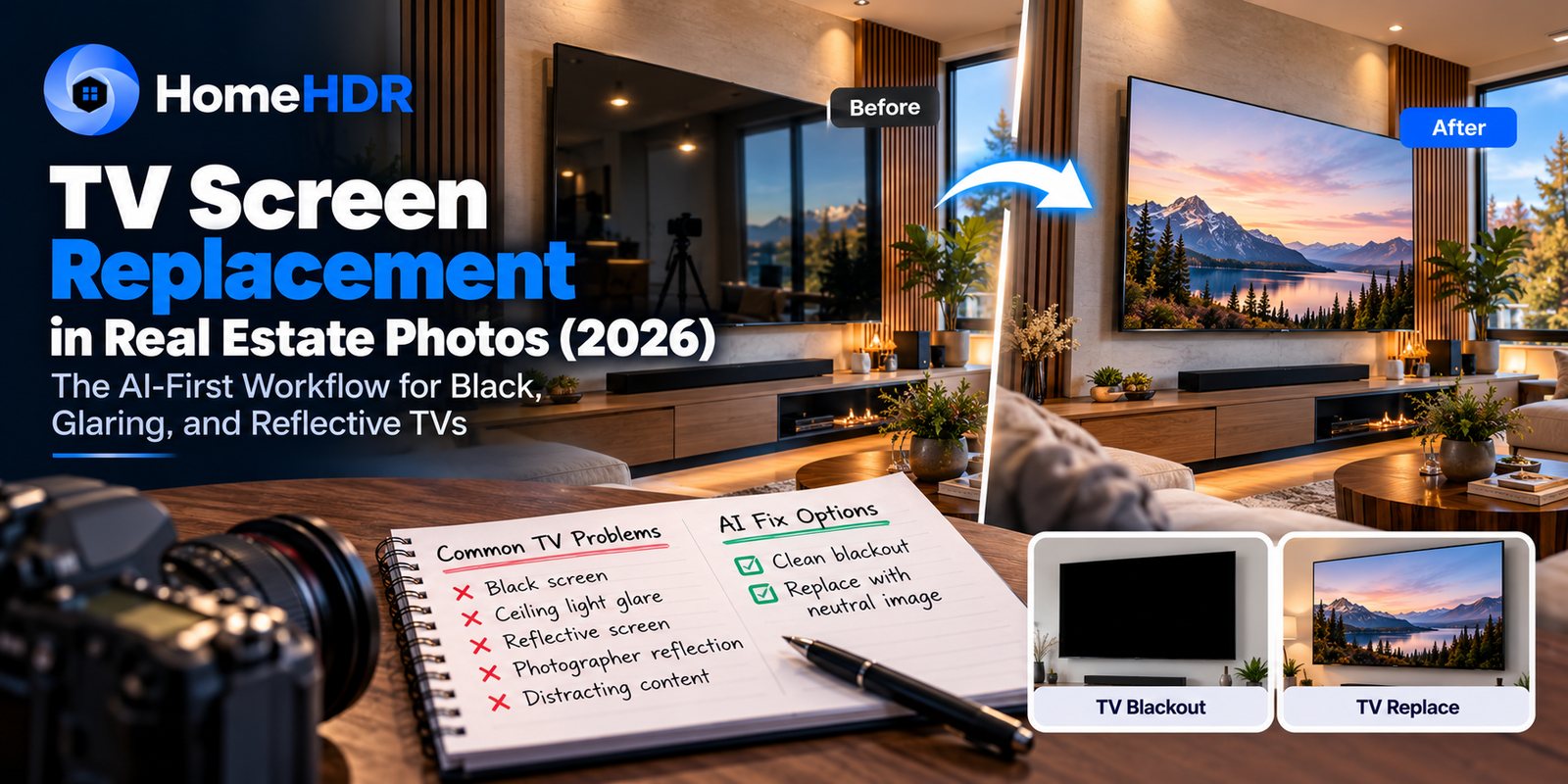
Quick answer: The black rectangle on the living-room wall, the ceiling lights across the bedroom TV, and the flat screen that caught your tripod are all fixed in post. There are two fixes. A blackout makes the screen read as switched off. A replace puts a soft, neutral image on it. Neither needs MLS disclosure under California AB 723 or NAR Standard 12-5, because what is on a screen is not part of the property. In HomeHDR, TV Blackout is a toggle included in the normal photo price of $0.36–$0.55. A specific image on the screen is a separate touch-up with Re-edit by Prompt, at one touch-up credit a photo.
You know the shot. The living-room pullback is clean, the window pull is tight, the furniture reads warm, and then back at your desk you see the 65-inch TV reflecting the ceiling lights, the sliding door behind you, and a hint of tripod leg. A reshoot isn't an option, and the agent wants the gallery by 8am.
This guide covers the two edits that matter, when to use each, the disclosure question photographers keep arguing about, and what the manual and AI workflows really cost you.
What is TV screen replacement in real estate photos?
Direct answer: TV screen replacement is the post-production edit that removes whatever a TV is reflecting or displaying in the capture (ceiling lights, the photographer, a paused streaming frame, a logo) and swaps it for either a dark, switched-off screen or a soft neutral image.
Two different edits sit under that one name:
- TV screen blackout. The screen reads as switched off. It is fast, it suits nearly every room, and it is what most working photographers reach for first.
- TV screen replace. A soft image sits inside the screen boundary: a muted landscape, a piece of art, or a monochrome gradient. The screen reads as on, with nothing distracting. It is more common on luxury listings and short-term rentals, where a blackout can feel sterile.
The choice follows the room:
| Room or listing type | Usual edit | Why |
|---|---|---|
| Standard family living room | Blackout | Reads clean and doesn't pull the eye from the sofa and fireplace |
| Luxury media room | Replace with a soft landscape | A dark panel can fight the design intent |
| Short-term rental | Replace with a neutral image | Guests are buying a feeling, so a lived-in look helps |
| Bedroom with a wall-mounted TV | Blackout | Smaller screens read fine as off |
| Kitchen counter TV | Blackout | Small and incidental |
| Home gym | Replace with a neutral image | A dark screen can look abandoned in a gym |
When in doubt, use the blackout and keep it consistent across the gallery. One treatment on every screen looks deliberate. A mix looks like an accident.
Why do TV screens look so bad in listing photos?
A switched-off flat screen is close to a mirror. The glass reflects whatever is in front of it, and during an interior shoot that usually means:
- Ceiling downlights, which show up as a line of bright points across the screen.
- The sliding door or window behind the photographer, which turns the TV into a second window.
- The photographer, meaning the tripod leg, the camera body, or sometimes a face.
- Window light bouncing off hardwood, which leaves a mottled bright patch across the lower screen.
- A TV left on, showing a paused frame, a channel logo, or a screensaver.
It only becomes a problem in post because your attention on site is on exposure, the window view, the vertical lines, and the composition. On a 27-inch monitor at 11pm, it is suddenly the first thing you see.
The on-site fixes (putting a nature scene on the TV, draping a cloth, angling the screen) don't scale across a full shoot day. The fix moves to post.
Is TV screen replacement allowed on MLS photos?
Direct answer: Yes. A TV screen blackout or replacement is an enhancement edit, so it does not need disclosure under California AB 723 (effective January 1, 2026) or NAR Standard 12-5. You are changing temporary on-screen content, not a permanent or material feature of the property. The TV, its bezel, and its mount all stay in the photo.
The confusion comes from treating all image modification as one category. The test is whether the edit changes what a buyer would understand about the property. Screen content doesn't. Someone touring the home sees whatever the occupant has on the TV that day.
The edits that do need disclosure are a different group:
| Edit | Disclose? | Why |
|---|---|---|
| TV screen blackout | No | Removes temporary on-screen content |
| TV screen replace with a soft image | No | Same reasoning: the screen content isn't the property |
| Lamp glare or lens flare removal | No | Temporary optical artifact |
| Removing a trash bin, car, or hose | No | Temporary items, not property features |
| Virtual staging | Yes | Adds a material visual element |
| Sky replacement | Yes | Changes the weather or time of day as presented |
| Virtual twilight | Yes | Changes the time of day as presented |
| Removing a satellite dish, shed, or power line | Yes | Permanent features of the property |
| Removing a crack, stain, or roof damage | Yes | Material condition of the property |
Two sensible limits apply. Your local MLS can set rules stricter than these, so its rules win. And don't put a view, a room, or anything else on the screen that could pass for a feature of the home. For the full framework, see the AB 723 edit-by-edit disclosure guide, our MLS photo requirements breakdown, and the object removal guide.
The manual Photoshop workflow
In Photoshop, a trained editor usually spends a few minutes per screen:
- Trace the screen boundary. The Pen tool handles straight edges. An angled TV needs a transform as well.
- Mask the screen. Convert the path to a selection and feather it slightly so the edge isn't aliased against the bezel.
- Fill or paste. For a blackout, use a near-black such as #0A0A0A rather than pure #000000. For a replace, paste the image and transform it to the screen's perspective.
- Add a hint of reflection. A real screen always picks up some room light, so a pure fill looks fake. A low-opacity gradient that follows the room's light direction fixes that.
- Leave the bezel and mount alone. The edit stays inside the frame.
None of that is hard for an experienced editor. The issue is repetition. A gallery with four visible TVs adds real time on top of the HDR merge, window pull, color balance, and vertical correction you were already doing.
The AI workflow
AI editing removes the tracing and masking. In HomeHDR, the blackout works like this:
- Upload the set. Brackets, JPEGs, or RAW files.
- Switch on TV Blackout. You can set it for a new project, or in the editor for a single photo.
- The screens are handled in the same render as the HDR merge and your other settings. You don't tag or select anything.
- Review the gallery. You are checking for a misfire, not doing the edit.
Your time moves from editing to review. A tricky screen (flush-mounted, sharply angled, or hit by direct sun) is worth a closer look. If one needs another pass, re-rendering a photo you have already paid for is free.
The result is a screen that reads as dark glass with a faint room reflection, rather than a flat black patch that looks cut out of the wall.
What does TV screen replacement cost in 2026?
| Path | Cost per photo | Turnaround | Notes |
|---|---|---|---|
| In-house Photoshop | Your hourly rate | A few minutes per TV | Full control, limited by your editing hours |
| Outsourced editor | About $1.50–$3.00, plus any TV surcharge | Commonly a day or more | Revision rounds extend the turnaround |
| HomeHDR TV Blackout | $0.36–$0.55, no surcharge | Under 5 minutes per photo | Included in the normal render |
| HomeHDR Re-edit by Prompt | One touch-up credit, $1.60–$2.50 | Minutes per photo | For a specific image on the screen, paid on top of the photo |
The time adds up faster than the money. At 5 listings a week with 3 visible TVs each, you edit about 780 screens a year. At 5 minutes per screen, that is 65 hours of TV work alone. As with most of this category, AI editing is mainly a time decision, not a cost one.
Common failure modes
- A dark picture frame or mirror near the TV. Check dark, screen-shaped objects during review, whichever workflow you use.
- Strong direct sun on the screen. Moderate glare is routine. Blown-out glare is harder, so shoot from an angle that keeps the window off the screen when you can.
- A TV partly hidden by a plant or furniture. Check that the edit runs cleanly around whatever overlaps the screen.
- A flat, pure-black fill. This is what makes a manual blackout look fake. Keep a slight lift and a faint reflection.
- A flickering screen across brackets. A TV that changes between frames can leave ghosting on the screen after an HDR merge. Switching it off before you shoot avoids the problem.
- Reflections of the TV elsewhere. A polished floor or mirrored table can repeat the screen. That is a separate edit, and most listings don't need it.
Where HomeHDR fits
HomeHDR includes TV Blackout as a toggle in the standard render, alongside HDR merge and window pull. It works on wall-mounted and stand TVs and on computer monitors, at any viewing angle, and leaves the bezel and mount untouched.
- Blackout pricing: included in the normal $0.36–$0.55 per photo, with no per-screen fee.
- Turnaround: under 5 minutes per photo.
- Free trial: 15 free edits, no credit card.
- Guarantees: 60-day money back, a double refund if your first month doesn't save you 10 hours, and unlimited free re-processing if the edits don't match your manual quality.
- Disclosure: none needed for a TV screen edit.
What HomeHDR doesn't do: there is no one-click option that puts an image on a screen. If you want a specific picture on the TV, use Re-edit by Prompt: mark the screen, describe what you want, and it costs one touch-up credit. Check that result closely, since it is a generative edit. For a magazine-level media room where every shadow is matched by eye, a skilled retoucher is still the better choice.
Key takeaways
- TV screen edits come in two styles: blackout (reads as switched off) and replace (a soft neutral image).
- Blackout is the safe default. Replace suits luxury media rooms and short-term rentals.
- Neither needs MLS disclosure under AB 723 or NAR Standard 12-5, though a stricter local MLS rule always wins.
- A switched-off TV is close to a mirror, which is why the problem shows up on your monitor and not on site.
- A convincing blackout is not pure black. It needs a slight lift and a faint reflection.
- At 5 listings a week with 3 TVs each, manual screen edits come to about 65 hours a year.
- In HomeHDR, TV Blackout is included in the photo price. A chosen image on the screen is a Re-edit by Prompt touch-up.
Frequently asked questions
Do I have to disclose TV screen replacement on an MLS listing? No. A TV screen blackout or replacement is an enhancement edit under California AB 723 and NAR Standard 12-5. You are changing temporary on-screen content, not a permanent feature of the property. If your local MLS has a stricter rule, follow that rule.
What's the difference between a TV blackout and a TV screen replace? A blackout makes the screen read as switched off. A replace puts a soft neutral image on it, such as a muted landscape or a gradient, so it reads as on with nothing distracting. Blackout is the default for most listings.
Why do TV screens always look reflective in real estate photos? A switched-off flat screen is close to a mirror. It reflects ceiling lights, the door behind the photographer, the tripod, and bright patches on the floor. You tend not to notice on site because your attention is on exposure and composition.
Can I just turn the TV on and shoot a nature scene? You can, but it is rarely worth it. You need the remote, a static image (motion causes ghosting in an HDR merge), and a screen brightness that suits the room. Across a full shoot day, fixing it in post is usually faster.
Does HomeHDR's TV Blackout affect the bezel or the wall mount? No. The edit applies to the screen, and the frame and mount stay as they were. It works on wall-mounted TVs, stand TVs, and computer monitors.
What happens if the TV is showing a paused frame or a channel logo? A blackout replaces it, so whatever was on the screen is gone. That is also useful for keeping logos and copyrighted frames out of a public listing.
Can I put a specific image on the TV with HomeHDR? Not with the toggle, which only does blackout. For a chosen image, use Re-edit by Prompt: mark the screen, describe what you want, and it costs one touch-up credit.
Does a TV screen edit change the rest of the photo? A blackout runs in the same render as your other settings and only changes the screen. Re-edit by Prompt is generative, so compare the result against the original before you deliver it.
How does HomeHDR price TV screen edits? TV Blackout is included in the normal per-photo price of $0.36–$0.55, with no per-screen fee. Re-edit by Prompt uses touch-up credits, which cost $1.60–$2.50 each depending on the pack.
Fix the reflective screen without opening Photoshop. HomeHDR blacks out TVs in the same render as your HDR merge, with the bezel and mount left alone and no disclosure needed. Start with 15 free edits, no card required.
By the HomeHDR Team.
Keep reading
- TV Screen Blackout in HomeHDR: Remove distracting screen glare for a cleaner room presentation.
- MLS Photo Requirements 2026: AI Disclosure, Editing Rules & Compliance Guide
- AB 723 for Real Estate Photographers (2026): The Edit-by-Edit Disclosure Guide
- Object Removal in Real Estate Photos (2026): What Is Safe and What Needs Disclosure