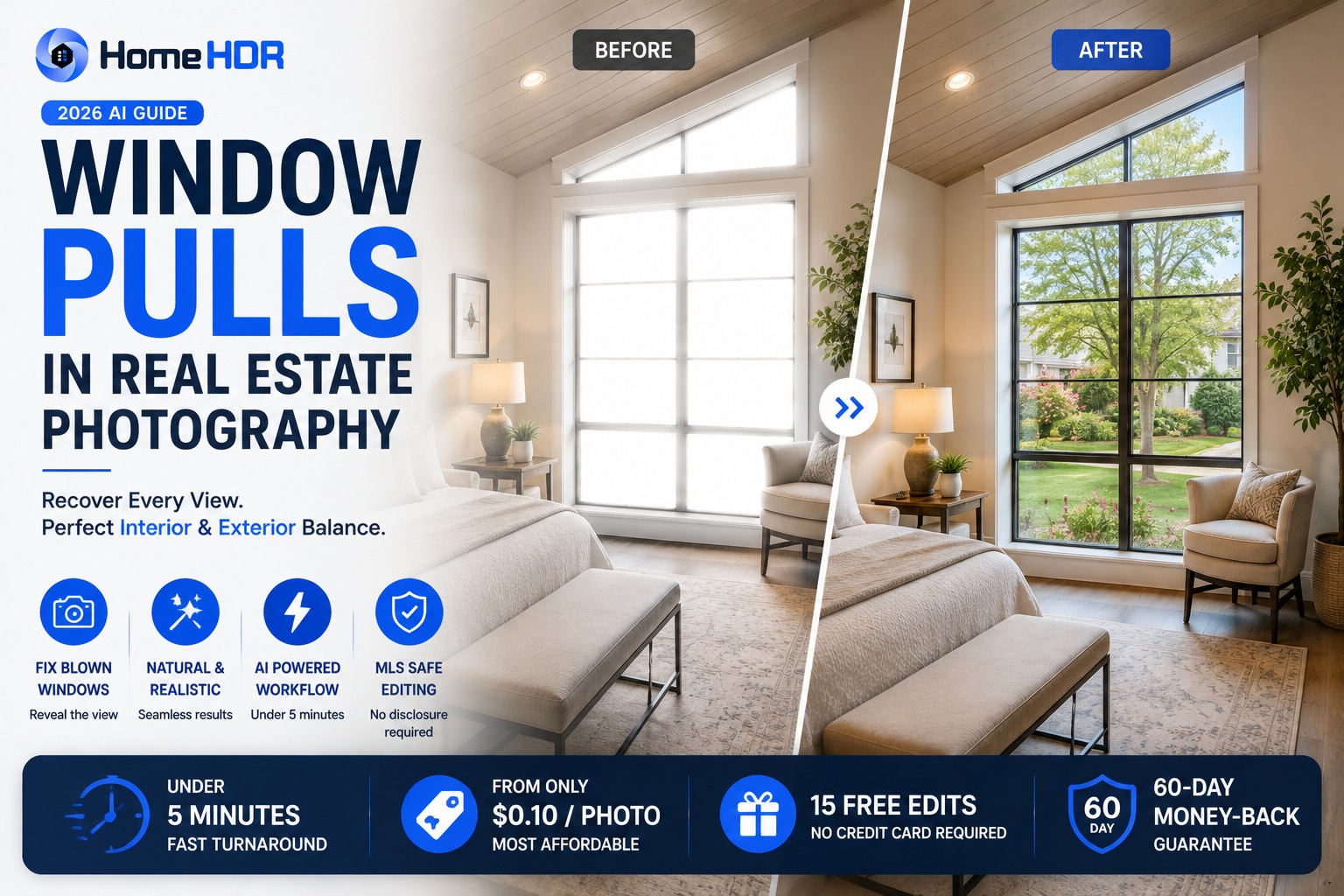
Quick answer: A window pull is the technique that keeps the exterior view visible through a bright window without underexposing the room around it. On site, you shoot HDR brackets (typically 5 at 2 stops, or 7 at 1.5 stops for demanding windows). In post, you either blend the exposures manually in Photoshop with layer masks (the traditional flambient-adjacent workflow, 10 to 20 minutes per photo for a skilled editor) or run the brackets through an AI editor trained on real estate work. HomeHDR handles window pulls in under 5 minutes per photo at $0.36 to $0.55, with 15 free edits, no credit card. Important compliance note: a window pull is exposure blending. It does not change the property, so it is not the kind of alteration California AB 723 targets, and it still presents the "true picture" that Article 12 of the NAR Code of Ethics asks for. Everything below covers on-site bracketing, both editing methods, the disclosure question, and when each workflow makes sense.
You have had the moment. You are on site, the interior looks perfect through the viewfinder, and the moment you check the back of the camera you see it: the window is a sheet of white paper. The million-dollar view outside, the tree canopy, the water, whatever the seller is paying to advertise, all gone. You know what has to happen: brackets on the tripod, layer masks in Photoshop tonight, another 20 minutes on top of the shoot.
Window pulls are the technique real estate photography lives and dies by. Buyers register a blown-out window as "cheap listing" before they can articulate why. And done well, a clean window pull is one of the strongest signals that a professional photographer was on the property. What follows is the peer to peer breakdown of how the technique actually works in 2026, both on the manual side and the AI-first side that most working photographers are moving to.
What is a window pull in real estate photography?
A window pull is the editing technique that recovers the exterior view visible through a bright window while keeping the interior of the room properly exposed. Mechanically, it is an exposure-blending operation: you combine an image that is exposed correctly for the room (windows blown out) with an image that is exposed correctly for the view outside (interior dark) into a single balanced photo where both are properly visible.
The name comes from the outcome: you are "pulling" detail into the window that a single-exposure photo would lose. Every professional real estate photographer produces window pulls on every listing that has a meaningful outdoor view. In luxury markets, missing a window pull is a re-shoot situation.
Why do windows blow out in the first place?
Cameras, even the best modern mirrorless bodies with 15+ stops of dynamic range, cannot capture the full brightness range of a lit interior plus a sun-drenched exterior in one exposure. The difference between a room lit at ISO 100, f/8, 1/60 and the same room shot to hold the exterior view is often 5 to 9 stops of dynamic range. That is beyond what any single frame can hold cleanly, especially with the standard real estate ultra-wide at f/8 and mid-ISO.
Two practical scenarios where this hits hardest:
- Daylight interiors with big windows. A living room shot at 11am with south-facing windows means either the interior is properly lit (windows are white) or the exterior is visible (interior is a cave). Neither works for a listing photo.
- Twilight interiors with lit rooms. A dusk shoot where you want the room warm-lit but also want the golden-hour sky visible through the window. Same dynamic range problem, harder to shoot around.
The fix is always the same technique in different flavours: capture multiple exposures, blend the range in post.
Three ways to get a clean window pull
There are three workflows working photographers use in 2026. Each has a place; each has a cost. Here is the honest comparison.
| Method | On-site time | Editing time | Cost per photo | Quality ceiling | Best for |
|---|---|---|---|---|---|
| Manual Photoshop (flambient-style) | Standard bracket time | 10 to 20 min | Your time | Highest, for luxury and hero shots | Luxury listings, hero shots, complex tree lines |
| Outsourced editing | Standard bracket time | 24 to 72 hr turnaround | $2 to $5 per photo | High (varies by editor) | Photographers who batch weekly and do not need overnight |
| AI editing (real-estate-trained) | Standard bracket time | Under 5 min | $0.36 to $0.55 | Professional standard on 80% to 90% of shots | Volume days, next-morning agent delivery |
The right answer is usually a stack, not a single choice. Most working photographers in 2026 shoot the same HDR brackets on every listing and route photos to different editing lanes based on the shot's role in the gallery.
What you shoot on site (the bracketing sequence)
The window pull's quality is decided on site, not in editing. Get the brackets right and every editing path (manual, outsourced or AI) has clean source material to work with. Get them wrong and no editor, human or AI, can save the shot.
Standard bracket sequence for interior + window pull:
- 5 brackets at 2-stop intervals. Works for most rooms with moderate window brightness.
- 7 brackets at 1.5-stop intervals. Use for rooms with bright direct sun through the window, or for twilight shoots where the dynamic range is extreme.
- 9 brackets occasionally, for a room with a single tiny bright window in an otherwise dark space (basements, some finished attics).
Shooting technique:
- Tripod is non-negotiable. Any camera movement between frames breaks the blend.
- Auto-bracket mode (AEB). Set the camera to fire the full sequence automatically on one shutter press.
- 2-second self-timer or remote release. Prevents shutter-touch vibration.
- ISO 100 to 400. Keep the noise floor low for cleaner blending.
- f/8 to f/11. Sharp corner to corner for the wide-angle lens.
- Manual white balance locked across all brackets. Do not let auto white balance drift between frames.
For a Sony A7 IV, Canon R6 II, Fujifilm X-T6, or any mid-tier mirrorless from the last three years, this sequence takes about 3 to 4 seconds per room and gives you clean brackets that render well in any editing pipeline.
The manual Photoshop method: how skilled editors do it
For the working photographer who wants to understand what an AI is doing (or wants to keep the option to hand-edit hero shots), here is the honest step by step. This is the technique the best real estate editors have been using for years. It works. It also takes real time.
- Import brackets to Lightroom or a Photoshop stack. Load 5 to 7 exposures as separate layers.
- Choose the base layer. Usually the middle exposure, the one closest to a well-lit interior.
- Add the underexposed frame as a top layer. This layer holds the exterior view detail.
- Add a black mask. The underexposed layer is invisible until you paint it in.
- Paint the mask over the window area with a soft white brush. This reveals the exterior detail exactly where the window is.
- Feather the mask edge. Soft transitions so the window does not look pasted in.
- Match the colour temperature. The underexposed exterior frame may pull a slightly different white balance than the interior. Correct it so the outside view feels natural.
- Blend curves and levels for a cohesive look across the frame.
- Global HDR tone-mapping pass if needed to balance the whole image.
- Final sharpening and export.
Time cost, honest estimate:
- New to the workflow: 30 to 45 minutes per photo the first month.
- Skilled editor: 10 to 20 minutes per photo.
- On a 30-photo listing: 5 to 10 hours of manual editing after the shoot.
The output, done well, is beautiful. It is also what turned a lot of photographers into midnight editors. That is the trade-off: the technique is not wrong, the calendar just stopped agreeing with it.
The AI window pull workflow
For the 80% to 90% of window-pull shots that do not need a hand-mask pass, AI editing trained on real estate work handles the blend automatically. The workflow:
- Shoot the same brackets you always shoot. No new gear, no new on-site technique. HomeHDR's HDR merge takes 3 to 8 brackets per photo, which covers the 5 and 7 bracket sequences above.
- Upload the bracket set to an AI editor. HomeHDR groups the brackets automatically from their EXIF timestamps on upload, so you drop in a whole card's contents with no folder sorting required.
- Turn on Window Pull and set its strength. It is an option on the render, applied when HomeHDR merges the brackets.
- Download the merged photo, MLS-ready. Turnaround is under 5 minutes per photo on average.
What the AI is doing internally is roughly what a manual editor does: identifying the blown-window region, sampling the darker exposure for exterior detail, feathering the mask edge, matching colour temperature across the blend, and applying a global tone balance. The difference is speed and consistency across a 30-photo gallery.
Where this workflow holds up well:
- Standard living rooms, bedrooms, and kitchens with typical windows.
- Interiors shot at any time of day where the brackets are clean.
- Twilight interiors with lit warm rooms + visible dusk exterior.
- Batch runs on volume days, with 30 to 80 photos processed in parallel.
Where a manual pass still wins:
- Extreme luxury or magazine-tier hero shots where every corner gradient has to be perfect.
- Rooms with unusual tree-line silhouettes through the window (complex organic edges).
- Shots where the client has specified a very particular look that only a specific editor can match.
Most working photographers land on a hybrid: AI for the routine gallery, manual pass for the 2 to 3 hero shots that earn it. The daily edit calendar gets meaningfully shorter without giving up the top-shelf work.
Does a window pull require MLS disclosure?
Direct answer: in general, no. A window pull is exposure blending, not property alteration. It does not change what the property physically looks like; it just captures the range of light that a single-exposure camera cannot. California AB 723 (effective January 1, 2026) is the law that requires a "digitally altered" label, with a link to the original photo, on listing images that have been altered. Because a window pull does not change the property, it is not the kind of alteration AB 723 targets: it sits in the same category as HDR merging, exposure correction, and colour balance, enhancement, not alteration. Outside California, the standard is Article 12 of the NAR Code of Ethics, which requires REALTORS® to present a true picture in their advertising (Standard of Practice 12-8 extends that to websites and other electronic media). A window pull shows the room and the view as they really are, so it presents a true picture.
This matters. Some photographers and agents in 2026 have become anxious about which edits trigger the new California disclosure requirement, and some have overcorrected by disclosing every edit, which reads as amateur and creates buyer confusion. Window pulls, HDR merges, TV screen blackout, and perspective correction are all safe. Sky replacement, virtual staging, twilight conversion, and permanent-fixture removal are what actually require disclosure.
Bottom line: whether you produce your window pulls manually in Photoshop, outsource them, or run them through an AI editor, the output is a compliance-safe MLS image.
What separates a great window pull from a bad one
Not every window pull is created equal. The signs of a great one:
- The exterior view reads natural. The trees, water, or neighbouring property look like they were photographed in the same light as the interior. No obvious "pasted-in" edge.
- The window frame is clean. No haloing or ghosting around the glass.
- The interior is not underexposed. You held the exterior detail without darkening the room to do it. A good window pull looks bright everywhere.
- Colour temperature is consistent. The exterior view is not blue while the interior is warm (or vice versa). Both are corrected to a matching white balance.
The signs of a bad one:
- Halos or bright fringes around the window frame.
- Ghosting on tree branches or wires, a sign the bracket alignment slipped.
- An exterior view that is obviously darker or bluer than physically plausible.
- An interior that is noticeably darker after the pull than before (over-corrected the mask).
If any of these show up in your final images, the fix is usually to reshoot brackets or run the source through a better editing pipeline, not to layer on more correction.
The real cost of window pulls: time, not skill
If you have been shooting real estate photography for more than a year, you can already do window pulls in Photoshop. The technique is not the problem. The problem is what it costs you in hours per week.
Ten to twenty minutes per photo, thirty photos per listing, three listings a week: that is five to ten hours of Photoshop time on window pulls alone, on top of every other edit the gallery needs. Multiply that by 50 working weeks and you are looking at 250 to 500 hours a year in front of a screen doing the same manual mask operation you have done ten thousand times.
The pain is not the technique. It is the calendar. That is the specific reason working photographers who used to hand-blend every window pull now route them through AI editing trained on the same technique: the output is close enough on the routine 80% of shots that the reclaimed evenings are the honest trade-off.
Where HomeHDR fits
HomeHDR handles window pulls as an option you turn on for the render, with a strength setting, and applies the pull when it merges your brackets. You upload the brackets, and the photo comes back with the exterior view properly held and the interior properly exposed, at full resolution with no watermark on paid plans. Turnaround is under 5 minutes per photo. Pricing runs $0.36 to $0.55 per photo depending on plan ($0.361 on Enterprise annual to $0.55 pay as you go), and the first 15 edits are free with no credit card.
Three guarantees apply from the first upload: a 60-day money-back, a double refund if you do not save at least 10 hours in your first month, and unlimited free re-renders if a window pull does not match your standard. Re-editing costs nothing: the photo is charged once, at first render.
What this will not do: replace a master editor's hand-mask pass on a $5M listing's great-room hero shot where every corner has to be perfect. On the hero shot, keep the manual workflow. What it does do: handle the other 27 photos in the gallery in the time it used to take to hand-blend one of them.
Key takeaways
- A window pull holds exterior view detail while keeping the room properly exposed. It is exposure blending, not property alteration.
- Get the on-site brackets right (5 at 2 stops for most rooms, 7 at 1.5 stops for demanding windows) and every editing method has clean source to work with.
- Manual Photoshop still wins on hero shots. AI editing handles the routine 80% to 90% of the gallery in minutes.
- A window pull does not change the property, so it is not the kind of alteration California's AB 723 targets, and it presents the true picture Article 12 of the NAR Code of Ethics asks for.
- The real cost of hand-blending window pulls is hours per week, not skill.
- Most working photographers in 2026 use a hybrid workflow: AI for the gallery, manual for the hero shots.
Frequently asked questions
What is a window pull in real estate photography? A window pull is the editing technique that recovers the exterior view visible through a bright window while keeping the interior properly exposed. It is produced by blending multiple exposures (one exposed for the room, one exposed for the outside) into a single balanced image.
Do you have to disclose window pulls on MLS listings? In general, no. A window pull is exposure blending: it does not add, remove or change anything in the property, so it is not the kind of alteration California's AB 723 requires a "digitally altered" label for, and it presents the true picture that Article 12 of the NAR Code of Ethics requires in advertising.
How many brackets do I need for a good window pull? Five brackets at 2-stop intervals works for most interiors. Rooms with bright direct sun through the window need seven brackets at 1.5-stop intervals. Nine brackets are occasionally needed for extreme dynamic range scenes like basements with small bright windows.
Can AI do window pulls as well as manual Photoshop editing? On the routine 80% to 90% of interior shots, modern AI editing trained on real estate work delivers window pulls that hold up next to hand-blended output, at under 5 minutes per photo instead of 10 to 20. On hero shots with complex tree-line silhouettes or luxury-listing standards, a manual editor still wins.
Why do my windows keep blowing out even when I use auto-HDR on my camera? Camera-native HDR modes are tuned for outdoor scenes, not the extreme interior and exterior dynamic range of a real estate interior with big windows. You need proper bracketing (5 to 7 exposures across 8 to 10 stops of range) plus post-processing that specifically handles the window-pull blend, not a single in-camera HDR shot.
How long does a window pull take in Photoshop? For an experienced editor, 10 to 20 minutes per photo. For someone new to the workflow, 30 to 45 minutes per photo the first month. This is why manual window pulls are the single biggest time cost in most real estate photography editing workflows.
How much does a window pull cost through an AI editing service? $0.36 to $0.55 per photo on HomeHDR (depending on plan), with Window Pull an option you turn on for the render and applied when the brackets are merged. Outsourced manual editing runs $2 to $5 per photo for a window pull specifically, or bundled into a $1.60 to $2.00 base image enhancement package on BoxBrownie.
Is there a difference between window pull and HDR? HDR is the broader technique of blending multiple exposures to hold both shadow and highlight detail. A window pull is a specific application of HDR: recovering the exterior view through a bright window. Every window pull is an HDR blend; not every HDR blend involves a window pull.
Can I do window pulls with a single-exposure shot and a fill flash? Sometimes, on smaller windows or lower dynamic range scenes. This is the flambient technique: a flash-lit interior plus an ambient exposure for the window. It works but requires flash gear on site and a manual blend in post, and it is slower to shoot than HDR bracketing. See our flambient vs HDR breakdown for the honest comparison.
Do window pulls work for twilight and dusk shots? Yes. Twilight interiors with lit warm rooms + visible dusk sky are one of the highest-value window-pull scenarios. Use seven brackets at 1.5-stop intervals to hold the range between the warm interior lighting and the fading exterior light.
Get your window pulls back in under 5 minutes without opening Photoshop. HomeHDR merges your brackets with Window Pull switched on, at $0.36 to $0.55 per photo. Start with 15 free edits, no card, and all three guarantees are active from the first photo.
Keep reading
- HDR Merge in HomeHDR: Blend bracketed shots into one clean, balanced exposure.
- Window Pull in HomeHDR: Keep exterior window detail visible without darkening the room.
- Best Real Estate Photo Editing Service in 2026: 6 Options Compared Honestly
- Flambient vs HDR: Which Real Estate Photography Technique Wins in 2026?
- MLS Photo Requirements 2026: AI Disclosure, Editing Rules & Compliance Guide