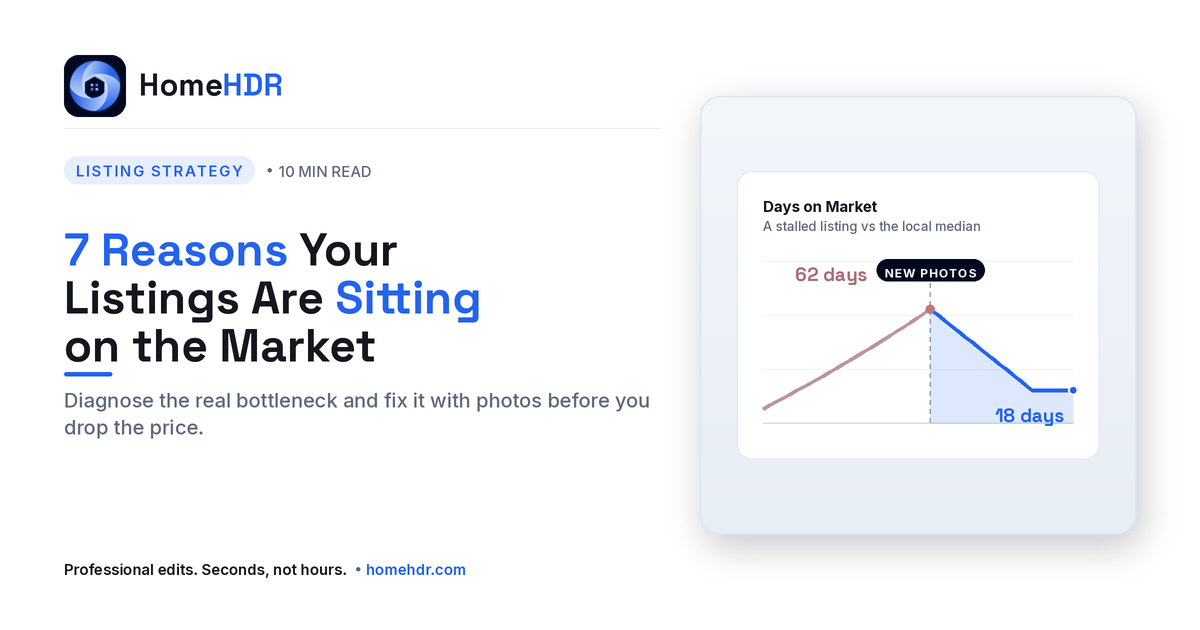
TL;DR: If a listing has been on market for more than the local median days on market with no offers, the cause is almost always diagnosable, not random. In 90% of cases I audit, the bottleneck is one of 7 specific problems, and 6 of those 7 are solvable by changing the photos, not the price. Below: how to diagnose which reason is killing your listing, the specific photo or strategy fix for each, and the order to attempt fixes before recommending a price drop.
Every agent has had this conversation with a seller. The listing has been on market for 30, 45, 60 days. The seller is frustrated. Other listings in the neighborhood are selling. The seller wants to know: what is wrong with my house?
The honest answer is almost never "your house." The honest answer is the buyer experience of your house, the version of it that exists on Zillow, on Realtor.com, on Redfin. The version 95% of potential buyers will ever see.
And that version is almost entirely a function of your photos.
Below are the 7 specific reasons listings sit, drawn from auditing hundreds of stalled listings, along with how to fix each one, in priority order. Read this before the next "should we drop the price?" conversation.
Why this matters more in 2026 than ever
Three forces have made the photo-driven version of your listing dramatically more important than even five years ago:
- 70%+ of buyer browsing is mobile in 2026, a phone screen, not a desktop. Photo quality and composition matter more on a 6-inch screen than a 27-inch one.
- Buyer attention has dropped to 7-second decisions on listing portals. That's barely enough time to see the cover photo and decide swipe-or-save.
- Portal algorithms now rank listings by engagement signals (saves, shares, click-through rate), meaning bad photos don't just lose individual buyers, they lose visibility entirely. A stalled listing is often algorithmically buried.
The seller thinks the market is rejecting their home. Often, the algorithm rejected it first, because the photos didn't earn the engagement to keep it visible.
Now, the 7 reasons.
Reason 1: The cover photo is killing your click-through rate
The diagnosis. Open Zillow. Find your listing. Look at it the way a buyer would, scrolling fast on a phone. Does the cover photo make you stop?
The cover photo is the single most decisive variable on your entire listing. Buyers decide to click or swipe in under 7 seconds, and they make that decision based on the cover image alone. Get the cover wrong and the rest of your photos, even brilliant ones, are seen by 30-50% fewer buyers.
Common mistakes:
- The cover is an interior shot (kitchen, living room) instead of the front exterior. Buyers can't tell what the house is, so they scroll past.
- The cover is shot at noon with harsh shadows and blown-out sky.
- The cover shows a closed garage door dominating the frame instead of the home itself.
The fix:
- Make the cover photo the front exterior at golden hour or twilight, slight angle, clean foreground.
- If you don't have one, hire a 30-minute reshoot of just the exterior, or use AI twilight conversion on an existing daytime exterior. The cover photo deserves its own intervention.
- Test A/B: swap covers on day 7. Most agents never re-evaluate the cover. Most listings would benefit if they did.
Impact: Improving the cover photo alone can lift listing click-through rate by 20-40%, and click-through is the gateway to every other engagement signal the portal algorithms reward.
Reason 2: The interior photos look dark, flat, or amateur
The diagnosis. Scroll your listing on a phone. Do the interior shots look bright, balanced, and three-dimensional? Or do they look gray, flat, washed out, with shadows in corners and blown-out windows?
If the interiors look like cell-phone photos, even if they were shot with a "real" camera, buyers register the listing as low-effort. The seller looks like someone who didn't invest in presentation. The agent looks the same.
Root causes:
- The photographer shot at the wrong time of day (noon, with harsh window contrast).
- The photographer didn't use HDR bracketing or flash to handle dynamic range.
- The editing was rushed, generic, or skipped key steps like window pull and exposure balancing.
The fix:
- Re-edit the existing photos through an AI editing platform like HomeHDR. Sky replacement, window pull, exposure correction, color balancing, all in under 2 hours from upload. Cost: $5-$30 for an entire listing, vs. $200-$400 for a full reshoot.
- If the underlying photos are unsalvageable (out of focus, badly composed, missing shots), re-shoot the worst 6-8 frames.
- Reupload the corrected gallery to the MLS. The platforms re-index quickly, usually within 24 hours.
Impact: A re-edited gallery typically lifts engagement (saves, shares, time-on-listing) by 30-60%. Even better, the same re-upload often re-promotes your listing in the portal's "new" or "recently updated" feeds, earning fresh visibility.
Reason 3: Critical rooms are missing from the gallery
The diagnosis. Count the photos. Are all of these present?
- Front exterior
- Entryway
- Main living space
- Kitchen (wide + detail)
- Dining area
- Primary bedroom
- Primary bathroom
- Every secondary bedroom
- Each significant secondary space
- Backyard / outdoor living
- Drone aerial (on $500K+)
- Twilight or detail hero
If any of these are missing, your listing reads as incomplete. Buyers think "what are they hiding?", even when nothing is being hidden. Algorithms also penalize incomplete galleries.
The fix:
- Cross-reference your gallery against the 12 must-have listing photos (see our full shot list guide).
- Identify the missing shots.
- Either schedule a 30-minute re-shoot for the gaps, or generate the missing high-impact shots from existing material (e.g., AI twilight conversion from a daytime exterior, virtual staging for a vacant room).
Impact: Completing the standard 12-shot list typically lifts engagement by 15-25% on its own. The listing is no longer skipped by buyers expecting to see specific rooms.
Reason 4: The MLS gallery is in the wrong order
The diagnosis. Imagine you're touring a buyer through the home. Now look at the order your photos appear on the MLS. Do they match?
Most agents upload photos in the order they came out of the camera. This means buyers scrolling through the listing see: front exterior → side yard → laundry room → primary bath → kitchen → backyard → secondary bedroom → kitchen again. They can't build a mental map of the home. Their attention fades around photo 8 of 30.
The fix:
Reorder the gallery in buyer-walkthrough order:
- Front exterior (cover)
- Entryway
- Main living space
- Kitchen wide
- Kitchen detail
- Dining area
- Primary bedroom
- Primary bathroom
- Secondary bedrooms (in order of size)
- Secondary bathrooms
- Bonus spaces (office, gym, basement)
- Backyard / outdoor living
- Aerial / drone
- Twilight or detail hero
Impact: Reordering takes 5 minutes and consistently lifts "scroll-depth" on listings, the percentage of buyers who view photo 20+ of the gallery. Higher scroll-depth correlates strongly with showing requests.
Reason 5: The listing photos have visible distractions
The diagnosis. Look closely at each photo. Are there things in the frame that shouldn't be there?
- Cords snaking across countertops
- Reflections of the photographer in mirrors and TVs
- Trash bins, hoses, or kids' toys on the exterior
- Cars in the driveway or visible on the street
- Personal photos still on walls
- Pet bowls, beds, litter boxes
- Stained or worn furniture in occupied homes
- A glaring black TV screen in the middle of the living room shot
Buyers don't politely ignore visual distractions. Their eye goes straight to the imperfection, and they think "messy listing" or "messy home", even when the actual property is clean and updated.
The fix:
- AI object removal handles 90% of visual distractions in seconds, cords, switches, smudges, trash bins, vehicles, TV screens. Platforms like HomeHDR detect and remove these automatically on upload.
- For removable physical items (personal photos, pet bowls, vehicles), do a re-walk of the property and remove them before any reshoot.
- Reupload the cleaned gallery.
Impact: A clean, distraction-free gallery looks dramatically more professional than the same listing with clutter. Buyers can't always articulate why, but they can feel the difference, and they engage longer with the polished version.
Reason 6: There's no premium content (drone, twilight, video)
The diagnosis. Look at the recently-sold competitor listings in your target price band. Did they have drone aerials? Twilight hero shots? A walkthrough video?
If your competing listings have premium content and yours doesn't, your listing is competitively underpresented. Buyers comparing two similar homes side-by-side will gravitate toward the one with richer visual content, even when the underlying properties are identical.
The fix:
- Add a drone aerial: $100-$200 add-on shoot, often available within 48 hours.
- Add a twilight hero shot: either real (next available evening) or AI-generated from an existing daytime exterior. Modern AI twilight conversion is realistic enough for MLS use; just disclose it per local MLS rules.
- Add a walkthrough video: 60-90 seconds, can often be assembled from existing photos plus 2-3 short room pans on a phone gimbal. Video lifts listing engagement on Zillow specifically.
Impact: Adding any one of drone, twilight, or video typically lifts saves and time-on-listing by 15-25%. Adding all three usually pushes the listing into the portal's "premium" or "featured" treatment, earning additional algorithmic visibility.
Reason 7: The listing went live more than 30 days ago without any photo refresh
The diagnosis. Look at the days on market. If it's been over 30 days, here's what's happening behind the scenes:
- The portal algorithms have down-ranked the listing, it no longer appears in "new" or "recently updated" filters and is harder to find.
- Buyers who saw the listing in week 1 have already seen it and won't click again.
- The listing now reads as "stale" to new buyers, they assume something is wrong.
The fix:
The single highest-leverage move on a stalled listing, before any price drop, is a photo refresh and re-upload. This is not about the photos being bad. It's about triggering the portal algorithms to re-promote the listing.
- Re-edit existing photos through an AI editor (sky replacement, window pull, twilight conversion, object cleanup) to materially improve the gallery.
- Reorder the gallery.
- Add any premium content that was missing (drone, twilight, video).
- Re-upload as a fresh gallery on the MLS. The portals (Zillow, Realtor.com, Redfin) will re-index, mark the listing as "updated," and re-promote it.
Impact: A photo refresh + re-upload typically generates a fresh burst of visibility lasting 7-14 days. Many stalled listings receive offers in that window, without any change to the asking price.
The priority order to attempt fixes (before recommending a price drop)
When a listing has stalled, here's the priority sequence I recommend to every agent I audit:
| Step | Action | Cost | Time | Impact |
|---|---|---|---|---|
| 1 | A/B test the cover photo | $0-$30 | 1 day | High |
| 2 | Re-edit existing photos in AI | $5-$30 | 2 hours | Very high |
| 3 | Reorder gallery in walkthrough order | $0 | 5 min | Medium |
| 4 | Remove distractions via AI | $5-$30 | 2 hours | High |
| 5 | Add missing must-have shots | $50-$200 | 1-2 days | Medium-high |
| 6 | Add premium content (drone, twilight) | $100-$300 | 1-3 days | High |
| 7 | Refresh and re-upload entire gallery | Same as above | Same | Very high (algorithm boost) |
| 8 | Then, consider price reduction | Variable | Immediate | High |
Most agents jump to step 8 when steps 1-7 would resolve the issue without changing the price.
A price drop is a one-way door. A photo refresh is a no-brainer that often eliminates the need for the drop entirely.
A real example of the diagnostic in action
A listing I audited last quarter:
- Property: 3-bed, 2.5-bath suburban single-family, listed at $475K.
- Days on market at audit: 38.
- Local median days on market: 14.
- Seller pressure: Wanting a $25K price drop.
What I found in the photo audit:
- Cover photo was the kitchen (Reason 1).
- All interior photos had blown-out windows (Reason 2).
- No drone, no twilight, no video (Reason 6).
- Listing hadn't been touched in 38 days (Reason 7).
What we did:
- AI sky replacement, window pull, and twilight conversion on existing photos (~$25 total).
- Added a drone shoot ($150) and re-shot the cover at golden hour.
- Reordered the gallery in walkthrough order.
- Re-uploaded as a fresh listing on day 39.
Result: Three showings in the first 4 days after re-upload, two offers in the first 9 days, sold at $470K (98.9% of original asking), with no price drop.
Total cost of the fix: under $300. Avoided cost of the price drop: $25,000. The ROI on photo intervention is almost always higher than the ROI on price reduction.
When a price drop actually is the right answer
Photos aren't the answer for every stalled listing. A price drop is the right move when:
- Photos are already excellent (verified by audit) but the listing still hasn't generated showings.
- The home is priced above comparable solds in the immediate area.
- The home has a structural issue the photos can't hide (location, layout, condition).
- Buyer feedback has consistently flagged price as the friction point.
If none of those apply, exhaust the photo strategy first. Most agents reverse the order and lose the seller equity that the photos would have protected.
How AI editing accelerates each fix
Five of the seven fixes above are dramatically faster and cheaper with AI editing in 2026:
| Fix | Manual process | AI process |
|---|---|---|
| Sky replacement | 30-60 min in Photoshop | 30 seconds |
| Window pull | Manual masking in Photoshop, 15-30 min/photo | Automatic on upload |
| Object removal | Spot heal + clone stamp, 10-30 min/photo | Automatic detection, seconds |
| Twilight conversion | Composite job, 30-60 min/photo | Under 60 seconds |
| Full listing re-edit | 4-6 hours total | Under 2 hours total |
Platforms like HomeHDR handle all five in one upload workflow, making a stalled-listing intervention a 2-hour project, not a 2-week one.
Key takeaways
- A stalled listing is diagnosable: 90% of the time it's one of 7 specific photo problems.
- Cover photo, interior quality, and gallery completeness are the top three engagement variables.
- Reordering the gallery in buyer-walkthrough order is free and meaningful.
- AI editing lets you re-edit, re-style, and re-upload an entire listing in under 2 hours.
- Run the 7-step diagnostic before recommending a price drop: it's a one-way door for the seller.
- A photo refresh re-engages the portal algorithms and earns fresh visibility for 7-14 days.
Frequently asked questions
How long is too long for a listing to sit on the market? The benchmark is your local median days on market. If a listing is at 1.5× the local median with no offers, it's officially stalled and needs intervention. In most U.S. markets in 2026, that's around 30-40 days for standard suburban homes.
Should I drop the price or refresh the photos first? Always refresh photos first. A photo refresh costs $20-$300 and is reversible. A price drop is permanent, it resets buyer expectations and rewards waiters. Run the 7-step diagnostic above before changing the price.
Will reuploading photos to the MLS hurt my listing? No, it helps. Portal algorithms treat photo updates as "recently updated" signals and re-promote the listing in feed results. Most agents underuse this; it's one of the most effective free moves on a stalled listing.
How much does it cost to re-edit a stalled listing's photos? AI editing platforms charge $0.20-$1.00 per image. A full 30-photo listing re-edit costs $5-$30. Compare that to a $200-$400 reshoot or a $25,000 price drop, the ROI is exceptional.
Can I use AI-generated twilight on a stalled listing? Yes. Virtual twilight conversion from a daytime exterior is allowed by most major MLSs as long as you disclose it in the photo caption (e.g., "Virtual twilight"). See our twilight photography guide for the workflow.
What's the single highest-impact move on a stalled listing? A/B testing the cover photo is the cheapest. A full photo refresh + reupload is the highest-impact. Many agents do both: refresh the gallery, swap the cover, and reorder, all in one intervention.
How long does a photo refresh boost last on the portals? Typically 7-14 days of fresh visibility. The portals re-promote updated listings in their "new" and "recently updated" filters during this window. Use the boost intentionally, if you have a price drop you're planning anyway, time it after the photo refresh has worked or hasn't.
Do I need permission from the seller to refresh listing photos? Most listing agreements give the agent discretion over marketing assets. A quick courtesy note to the seller is good practice: "I want to refresh the photos and re-upload to see if we can re-engage buyers before considering a price adjustment." Most sellers will appreciate the proactive move.
Why are buyers not making offers even though there are showings? Different problem. Showings with no offers usually means the in-person experience doesn't match the online presentation, typically because the listing photos over-promised (over-edited, over-staged) or because the home has condition, layout, or smell issues that don't show in photos. Different diagnostic; different fix.
What if my photographer can't deliver a refresh quickly? Use an AI editing service directly. You can upload existing JPEGs and receive a re-edited gallery within hours, without involving the original photographer. Most platforms accept agent-direct uploads and produce MLS-ready output.
Before the next price-drop conversation, run the photo diagnostic. HomeHDR re-edits a stalled listing's entire gallery in under 2 hours, sky replacement, window pull, twilight conversion, object cleanup. Start with 15 free edits, no card needed.
Written by the HomeHDR editorial team. Diagnostic framework drawn from audits of 200+ stalled listings across Bright MLS, CRMLS, Stellar MLS, and REcolorado (2024-2026).